
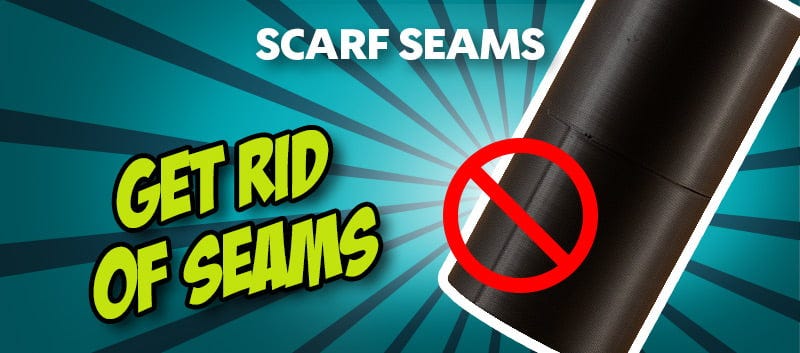
Avoiding Z seams: How to get smooth surfaces with Scarf Seam
You've put some serious effort into your 3D print, fine-tuned the settings, everything is running flawlessly, and then you spot the one detail that ruins the whole result: a visible line running across the entire model. That line is the so-called Z seam. On smooth or curved surfaces in particular, it stands out immediately and can make even a high-quality print look cheap.
Why do Z seams appear in the first place?
To solve the issue properly, it helps to understand what is happening behind the scenes. A Z seam appears every time your printer starts a new layer. The extruder pauses briefly, repositions, and that transition becomes visible. This happens on every single layer: the print head starts → extrudes material → stops → moves on.
Unfortunately, that start and end point does not disappear on its own. If it remains in the same place throughout the print, it forms a continuous line: the classic Z seam. Many users try to fix this by changing the seam position and simply moving it “to the back”. That can help, but it does not solve the core issue: the transition is still there.
Scarf Seam: the smarter way to achieve cleaner prints
This is exactly where Scarf Seam in Bambu Studio comes in - a feature that goes far beyond the usual tricks. Instead of merely relocating the seam, this method deliberately blends it. In practice, that means the transition between the start and end of a layer is no longer abrupt, but smoothly merged. With Scarf Seam in 3D printing, the material is distributed in a way that avoids creating a hard edge.
The result:
- no clearly visible seam,
- smoother surfaces,
- a noticeably more premium finish.
For models where surface quality really matters, the difference is significant.
How does Scarf Seam work technically?
The idea behind Scarf Seam is surprisingly simple, but extremely effective. Instead of starting and stopping the print at a single fixed point, the slicer changes the way material is laid down. Rather than producing a hard transition, it creates a gradual blend: the material is applied with a slight overlap and tapered off smoothly at the end. This visually softens the seam and makes it far less noticeable. On uniform surfaces especially, it can make the Z seam almost disappear.
Where can you find the Scarf Seam setting in Bambu Studio?
If you use Bambu Studio, you can enable Scarf Seam directly in the seam settings. Depending on the version, you may find it under the advanced print options.
The practical advantage is that you do not need to make complicated adjustments. Once the feature is enabled, the slicer handles the rest and automatically optimises the transitions.
When does Scarf Seam make the biggest difference?
This feature really comes into its own when appearance is a priority. That is especially true for models with visible outer surfaces, rounded geometries and decorative prints.
Typical use cases where Scarf Seam can make a major difference include:
- figurines and decorative objects,
- cylindrical or smooth-surfaced models,
- showpieces and presentation prints.
In these cases, Scarf Seam can make a clearly visible difference in 3D printing, often from the very first attempt.
What you should still keep in mind
Even though Scarf Seam improves a lot, it is not a substitute for solid baseline settings. If your print already suffers from broader issues such as incorrect temperature, over-extrusion or poor calibration, this feature will not magically produce perfect results.
So it is important to remember: Scarf Seam optimises the seam, but it does not fix fundamental printing problems.
Conclusion: smooth surfaces without a visible seam are absolutely achievable
If visible lines on your prints have been driving you mad, there is finally a solution that does more than just hide the problem. With Scarf Seam in Bambu Studio, you can significantly reduce Z seam lines in 3D printing and give your models a visibly cleaner surface finish. Instead of harsh transitions, you get smooth, flowing contours; instead of distracting lines, you get cleaner results. If appearance matters to you, this feature is a genuine game changer.
Latest reviews
-
Bambu Lab 3D Effect Plate Starry, A1 Mini
- Base plate with double-sided effect foil
- Individual surface
- Easy to use
-
Polymaker Panchroma™ PLA Black, 1.75 mm / 1000 g
- Print speeds up to 350 mm/s
- Ideal for creative projects
- Easy to print
-
Hanboost S2 Electric Cordless Rotary Tool Kit
- Lightweight, cordless & portable
- Highly concentric design for precise alignment
- 6-step speed regulation
-
Magazine Articles:
Discover 3DJake:
-
Great Britain: Free standard delivery from £69.90
-
Free
returns More than 10.450 products
We deliver worldwide to
more than 40 countries
