
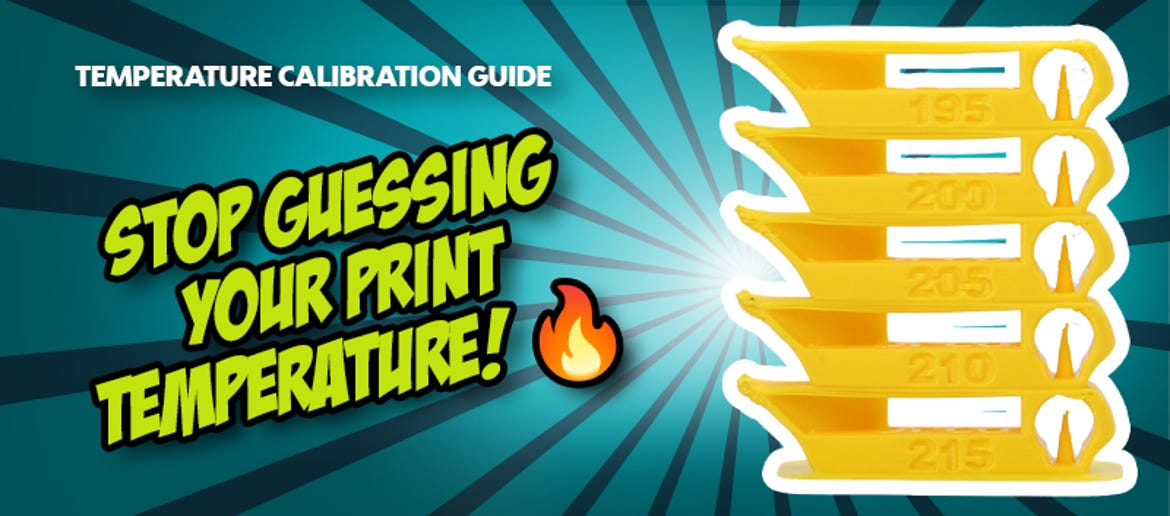
Temperature Tower in OrcaSlicer: No More Stringing & Weak Layer Adhesion
Stringing, rough surfaces, or components that break into individual layers at the slightest pressure? These problems are almost always the result of an incorrect printing temperature.
Many makers print PLA at a standard 200°C or PETG at 240°C. However, the optimal temperature can vary significantly even across the same material type, depending on the manufacturer, colour pigments, and additives. The answer is a Temperature Tower. We'll show you how to create one in seconds right in OrcaSlicer.
Why nozzle temperature dictates print success
The right temperature at the nozzle is a balancing act between viscosity (fluidity) and cooling:
- Printing too hot: The filament becomes too fluid. It flows uncontrollably out of the nozzle (oozing), leading to extreme stringing (fine cobweb-like strands) and messy overhangs.
- Printing too cold: The plastic does not melt sufficiently. The individual paths do not bond correctly, causing the print to break easily and the extruder gears to slip.
A calibrated temperature profile ensures a flawless surface, maximises the stability of your components, and eliminates the time-consuming post-processing to remove stringing.
Step-by-step guide: Creating a Temperature Tower in OrcaSlicer
In the past, temperature towers had to be meticulously drawn manually or set up using third-party G-code scripts. Modern programs like OrcaSlicer have these calibration tests fully integrated.
► Access the calibration: Open OrcaSlicer, click on the Calibration tab in the top menu bar, and select Temperature.
► Select the filament type: Choose the appropriate material. OrcaSlicer now automatically generates the completed 3D model and adds the necessary commands so that the printer cools or heats by exactly 5 °C per section.
► Slice and print: Click Slice and start the print. The printer will start, for example, at 230 °C at the very bottom and step down to 190 °C as it moves upwards.
► Visual analysis: Remove the finished tower from the print bed. Examine the different sections under good lighting. Pay attention to three things: Where is the stringing lowest? Where do the bridges look cleanest? And where is the text sharpest and most legible?
► Mechanical stress test: Carefully try to break the individual sections apart with your fingers. Very low temperatures often look clean visually, but break immediately. Choose the zone that is both visually appealing and mechanically stable.
Pro tip: OrcaSlicer writes the temperature changes directly into the layer control of the G-code. There is no need to make manual "ChangeAtZ" scripts or layer adjustments after generating the test tower. Once you've determined the perfect temperature, enter it in the OrcaSlicer filament profile under "Nozzle Temperature" and save the profile for future projects.
Conclusion: The perfect temperature is the foundation for top-quality prints
A temperature tower is not an optional extra, but rather the very first step when setting up a new spool of filament. Relying strictly on the standard values provided by manufacturers means you are not getting the absolute best out of your material. By taking 30 minutes to find the perfect temperature in OrcaSlicer, the three most common 3D printing issues - stringing, poor surface quality, and brittle layers - can be resolved all at once.
Latest reviews
-
Anycubic Photon Mono M7 Pro
- Light Turbo 3.0 lighting system
- COB light source
- Resin vat with dynamic temperature control
-
-
-
Magazine Articles:
Discover 3DJake:
-
Great Britain: Free standard delivery from £69.90
-
Free
returns More than 11.350 products
We deliver worldwide to
more than 40 countries
